
No-show recovery
Missed appointments get a prepared message to rebook.
An appointment that is not attended leaves an empty slot and a client who may simply have forgotten. This workflow notices the miss and prepares a short, polite message offering another time, for your team to approve.

Where this work slips today

A missed appointment is easy to notice and easy to leave. The agenda shows the empty slot, but following up is one more task in a busy day, so it waits or is done by hand, in a different tone each time. Meanwhile the client who missed it is not offered another time.
How this runs
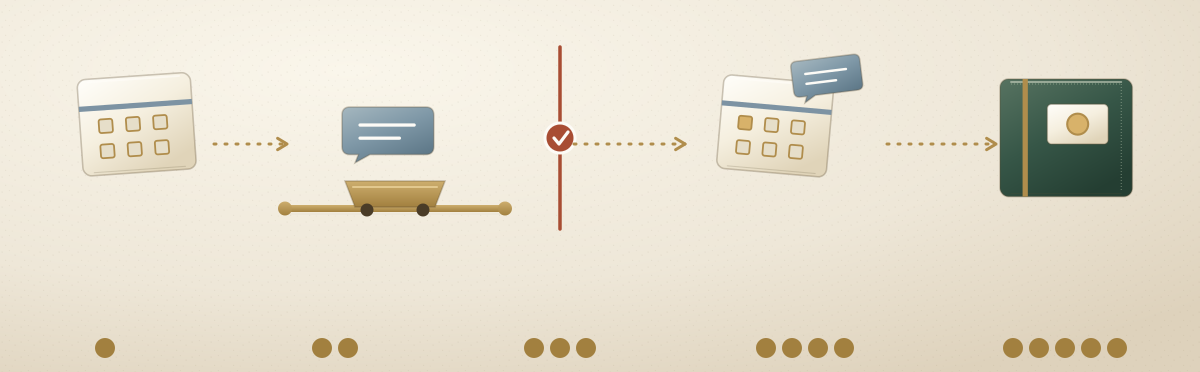
On Ateles, a missed appointment becomes a task that moves through a workflow we define with you before anything runs. Each step has a named owner, an agent or a person. The steps below are the intended design, not a record of work already running.
The five steps
- A missed appointment is noticed. Your agenda shows an appointment that was not attended. It becomes a task in the shared record, together with the appointment details and any reminders already sent.
- The agent prepares a message. A short message offering another time, in the tone you approved. Reminders stay on schedule within the limits you set, and the agent can do only what its permissions allow.
- The checkpoint. Like any message to a client, the rebooking message waits. A named team member approves, edits or stops it before it goes out.
- The message goes out. Once approved, it is sent and the slot can be offered again, including to people who are waiting for one.
- The record keeps it. The missed appointment, the message, the decision and any reply stay in the record, so the next reminder starts from what already happened.
Who does what
The agents do the preparing and your team does the deciding. That line is drawn before anything runs, and nothing crosses it without an approval.
- The agents prepare. The message to rebook, and the reminders around it, written in the tone you approved and sent on the schedule you set.
- Your team decides. Who gets contacted, how firmly, and what happens when a case is unusual. A reply that needs a person goes to a named person.
Example: a dental clinic
A patient does not attend a booked appointment. The clinic’s agenda shows it, and the missed appointment becomes a task. An agent drafts a short, polite message offering another time, in wording the clinic has approved.
The message waits at the checkpoint. The receptionist reads it and approves it, and then it goes out. If the patient replies with something unusual, the case goes back to a named person at the clinic. Each step stays in the record.
What the record holds, in order:
- The missed appointment and the reminders already sent
- The message the agent drafted
- The receptionist's approval
- The patient's reply, if there is one
See what you could delegate.
A free, no-commitment 30-minute conversation. You leave with a clearer picture, whether or not you work with us.