
Recall and reactivation
Patients who are due for a routine visit get a prepared reminder at the right time.
Routine visits come round on a cycle: a check-up, a cleaning, a yearly visit. This workflow uses your agenda and recall dates to see who is due, and prepares a short reminder for each, for your team to approve.

Where this work slips today

Recall lists are easy to build and hard to keep up. The list sits in the practice software, and working through it means calls and messages fitted between appointments, so it is done in bursts or not at all. Nobody can say at a glance who was already contacted and when.
How this runs
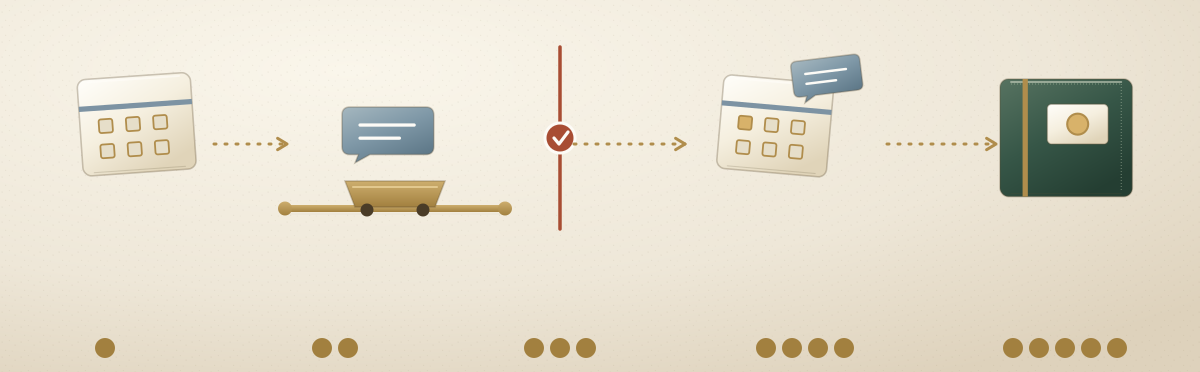
On Ateles, a patient who is due becomes a task that moves through a workflow we define with you before anything runs. Each step has a named owner, an agent or a person. Reminders draw only on scheduling and recall data, such as the last visit and the recall date, not on clinical notes. The steps below are the intended design, not a record of work already running.
The five steps
- A patient comes due. Your agenda and recall dates show that a patient is due for a routine visit, or has not visited for longer than the period you set. That becomes a task in the shared record, with the last visit and any reminders already sent.
- The agent checks the rules and prepares a reminder. It checks the rules you set, for example who should not be contacted and how often, and prepares a short reminder in your approved wording.
- The checkpoint. Anything sent outside the practice waits for approval by default, so a named team member approves, edits or stops each reminder.
- The reminder goes out. Once approved, it is sent, and the patient can book. Booking the visit stays with your team.
- The record keeps it. Who was reminded, when, the message and the decision stay in the record, so nobody is reminded twice by mistake and the next recall starts from what already happened.
Who does what
The agents do the preparing and your team does the deciding. That line is drawn before anything runs, and nothing crosses it without an approval.
- The agents prepare. Finding who is due from your agenda and recall dates, checking your rules, drafting each reminder and noting who has already been contacted.
- Your team decides. The recall periods, who to contact and who to leave out, the tone, and every decision to send. A reply about a health concern goes to the clinician, without a draft.
Example: a veterinary practice
A veterinary practice sets a yearly check-up for the animals in its care. Each week the animals that are due become tasks. An agent checks the practice’s rules, leaves out an owner who asked not to be contacted, and drafts a short reminder for each of the others.
The reminders wait at the checkpoint. The practice manager reads them, edits one and approves them, and then they go out. When an owner replies with a question about their animal’s health, the reply goes to the vet. Each step stays in the record.
What the record holds, in order:
- The animals due this week, from the practice software
- The owner left out, and the rule that left them out
- The reminders the agent drafted
- The practice manager's edit and approval
See what you could delegate.
A free, no-commitment 30-minute conversation. You leave with a clearer picture, whether or not you work with us.